
Trend Hunter MT4 review: its features on screen, repaint checked
Trend Hunter MT4 review: its features on screen,
and the repaint checked
Trend Hunter shows a lot on a single chart: two signal types, a stop and five targets for each, and a label that shows at a glance how far price traveled after each signal. I show its features one by one in MT4, then I check what it displays: out of 50 signals, none repaints, the labels follow their rule and every alert fires at the close of the bar. With one limit worth knowing: the label stops at 8 times the initial risk.
Real captures
Risk warning: this content is strictly educational and is not investment advice. Leveraged trading carries a high risk of losing capital. No indicator is recommended here.
The video: Trend Hunter's features one by one in MT4, then the quick check of repaint, labels and alerts.
Trend Hunter is a trend indicator for MT4 sold by Andrey Tatarinov on the MQL5 Market. On a single chart, it draws a trend line, two signal types, the stop and targets of each signal, and a label that shows how far price traveled after each signal.
This page shows those features one by one, as they appear in MT4, with the usage rule the author gives. Then it checks, on 50 signals replayed in the strategy tester (EURUSD H1), what the indicator displays: its signals do not repaint, its label follows its rule, its alert fires at the close of the bar.
The tables behind every figure, the exact test conditions and the limits are detailed below.
Trend Hunter version 4.2 for MT4. IC Markets, MT4 build 1492, EURUSD H1, strategy tester in visual mode, every tick modelling, 3 August to 16 October 2026. The 50 signals run from 3 August to 14 October. Full conditions and limits are detailed below.
What Trend Hunter promises
Trend Hunter is a trend indicator published on the MQL5 Market by Andrey Tatarinov, in an MT4 version (the one tested here, version 4.2 updated on 15 September 2026) and an MT5 version. It flags trend changes, then follow-up signals in the direction of the trend. Each signal carries a stop loss and targets that are multiples of the risk: 1:1, 2:1, 3:1, 5:1 and 7:1.
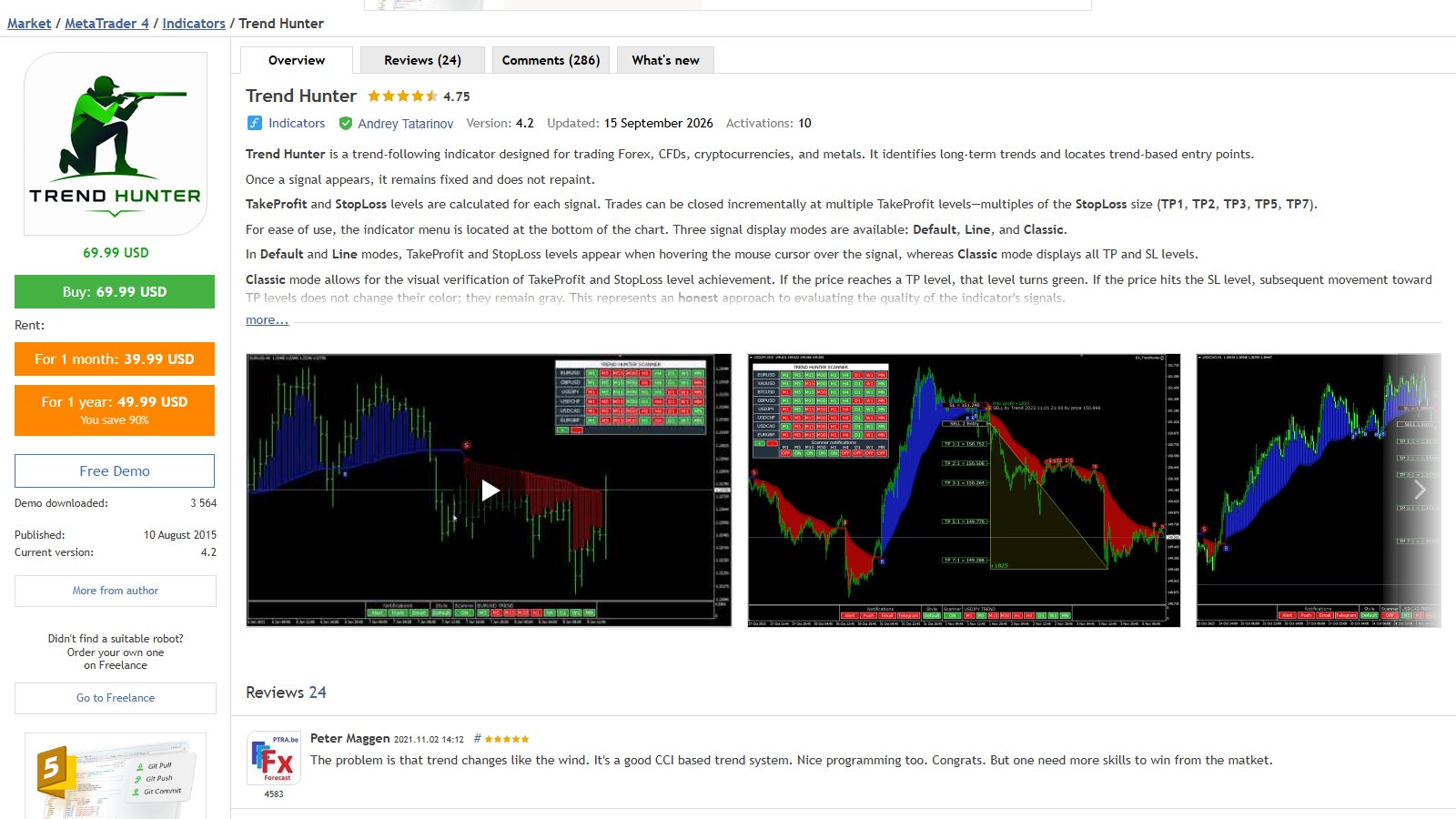
The page makes three checkable claims, and this test put them against the MT4 tester:
| What the page says or the indicator shows | Where it is checked |
|---|---|
| "Once a signal appears, it remains fixed and does not repaint" | Section 8 |
| The "BUY/SELL n +x points" label under each follow-up signal, in Classic style | Sections 3 and 9 |
| The panel's alerts (Alert, Push, Email) | Section 10 |
| Two signal types and the author's stop rule, three display styles, stop and targets readable by an EA, multi-pair scanner | Sections 2 to 6, shown but not measured |
Why this is the right question: a signal that moves afterwards draws a perfect history that nobody could have followed live. It is the first thing to check before buying any arrow indicator.
Two signal types, and the author's stop rule
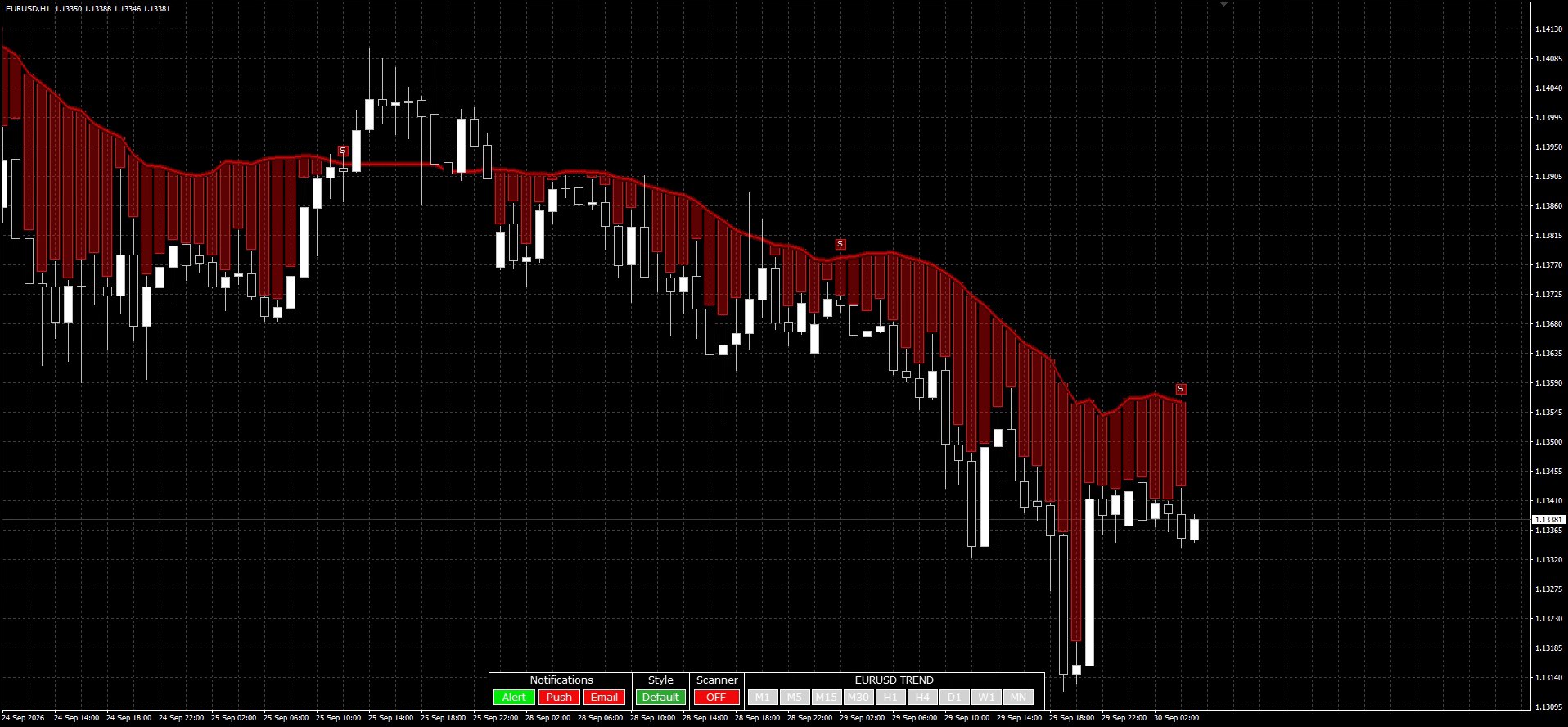
What follows is shown as it appears in MT4, without measurement. First, the two signal types. The circle marks a trend change. The square is a follow-up signal, in the direction of the current trend. The line follows the trend: blue going up, red going down.
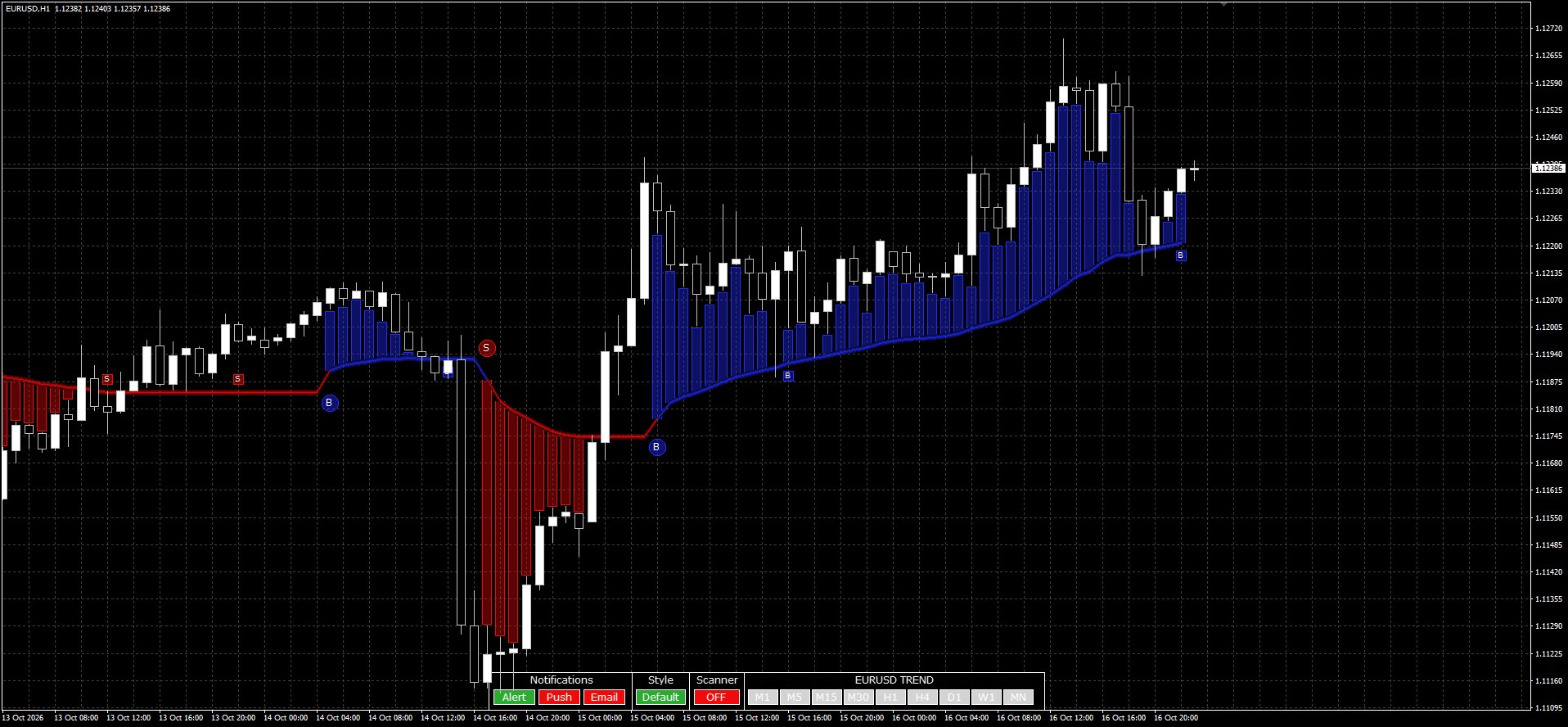
The rule of the author, Andrey Tatarinov, for using it: a tight stop on follow-up signals, a wider stop, or no stop at all, on trend changes, and the position closed when price touches the indicator line. That is his method: it is not part of the measurement, and this test says nothing about what it would earn.
Classic style: stop, five targets, and how far price went at a glance
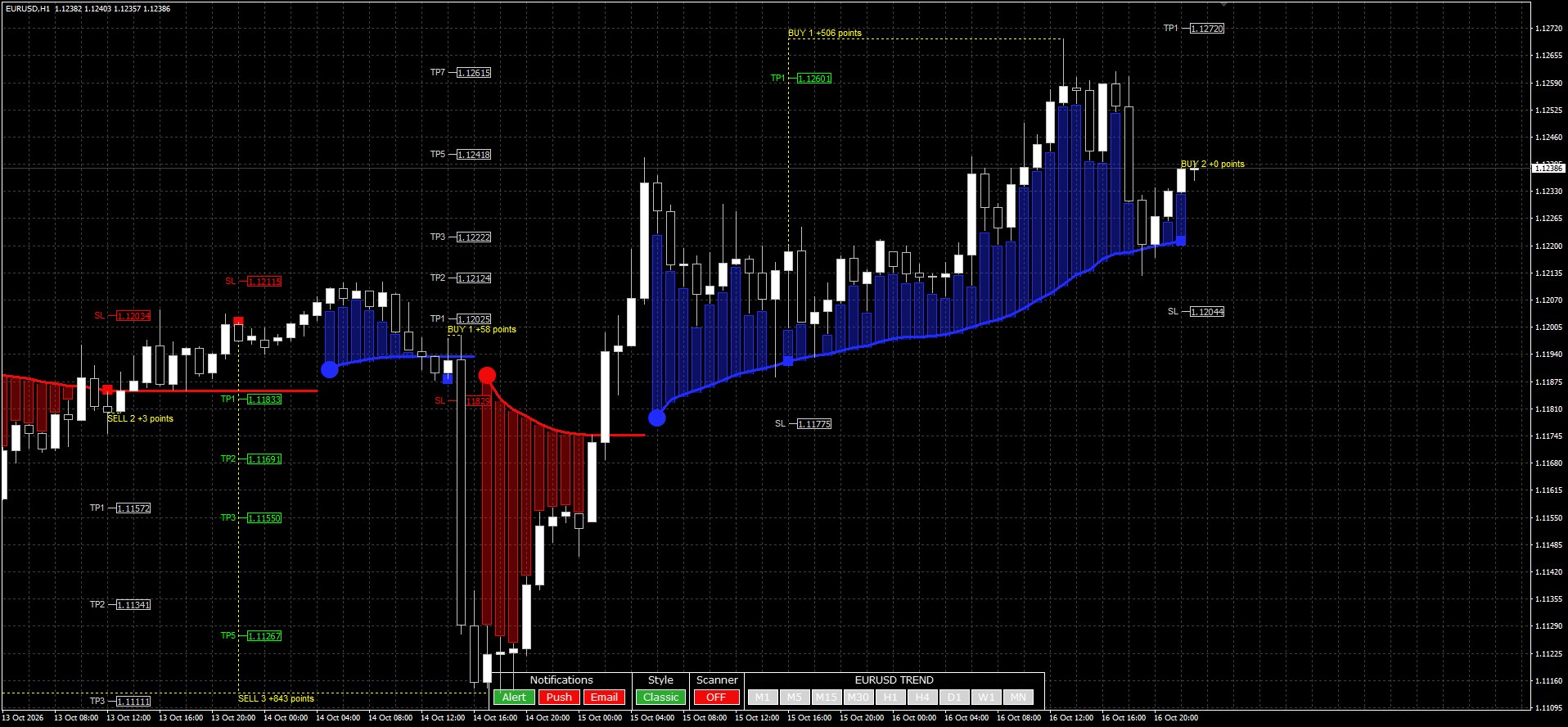
In Classic style, every signal carries its stop loss and five targets, from 1:1 to 7:1, drawn on the chart. And under each trend-following signal, a "BUY n +x points" or "SELL n +x points" label shows how far price traveled after the signal. At a glance, you spot the signals that went far, and the ones that stopped right away.
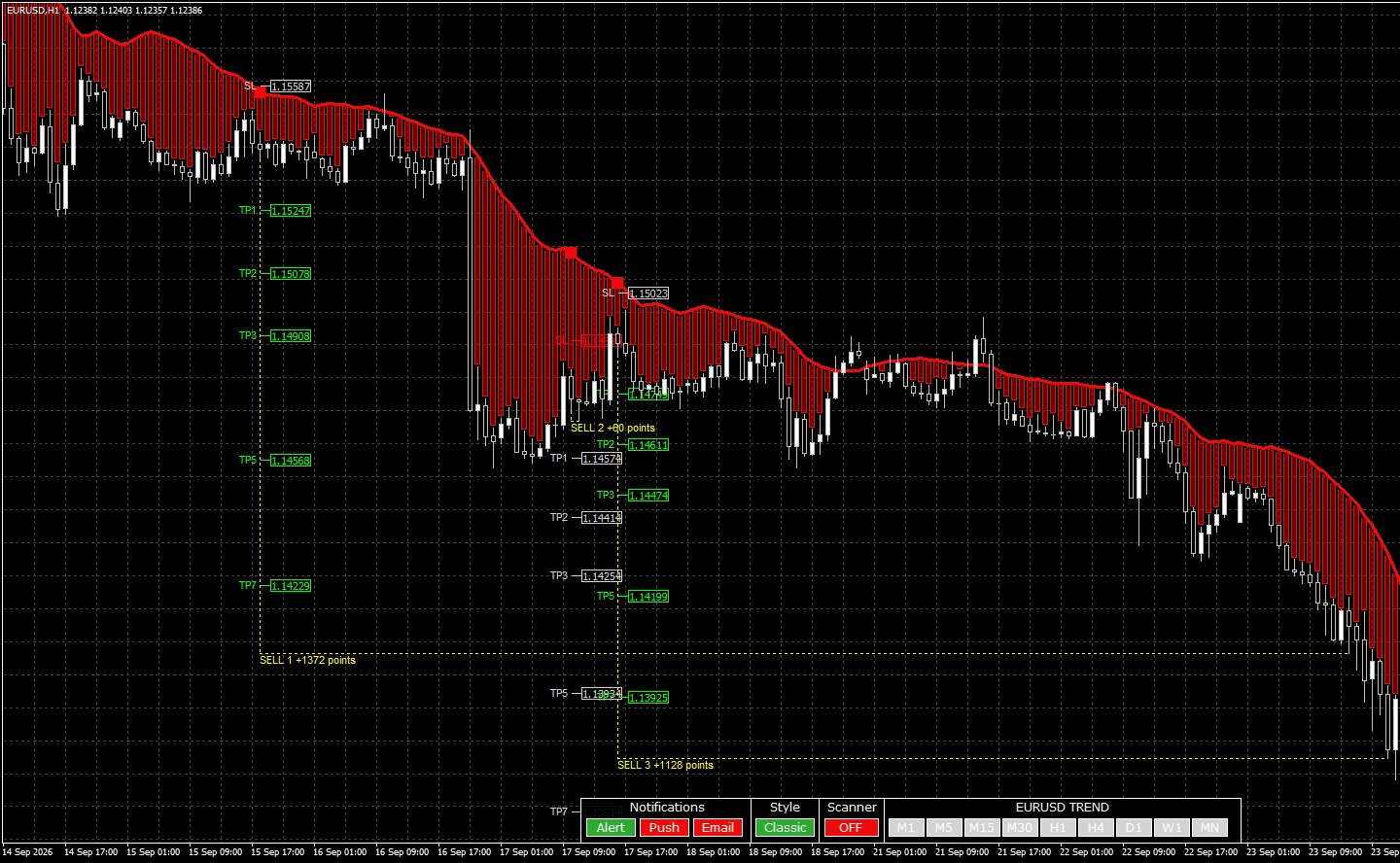
That number is the maximum favorable move after the signal, in points of 0.00001, counted up to the stop or up to 8 times the initial risk. It is a reading of the past, not a trading result: it does not say what a position would have given, nor what the next signals will do. The 36 labels read were counted again by hand (section 9).
Three styles, and the levels on hover
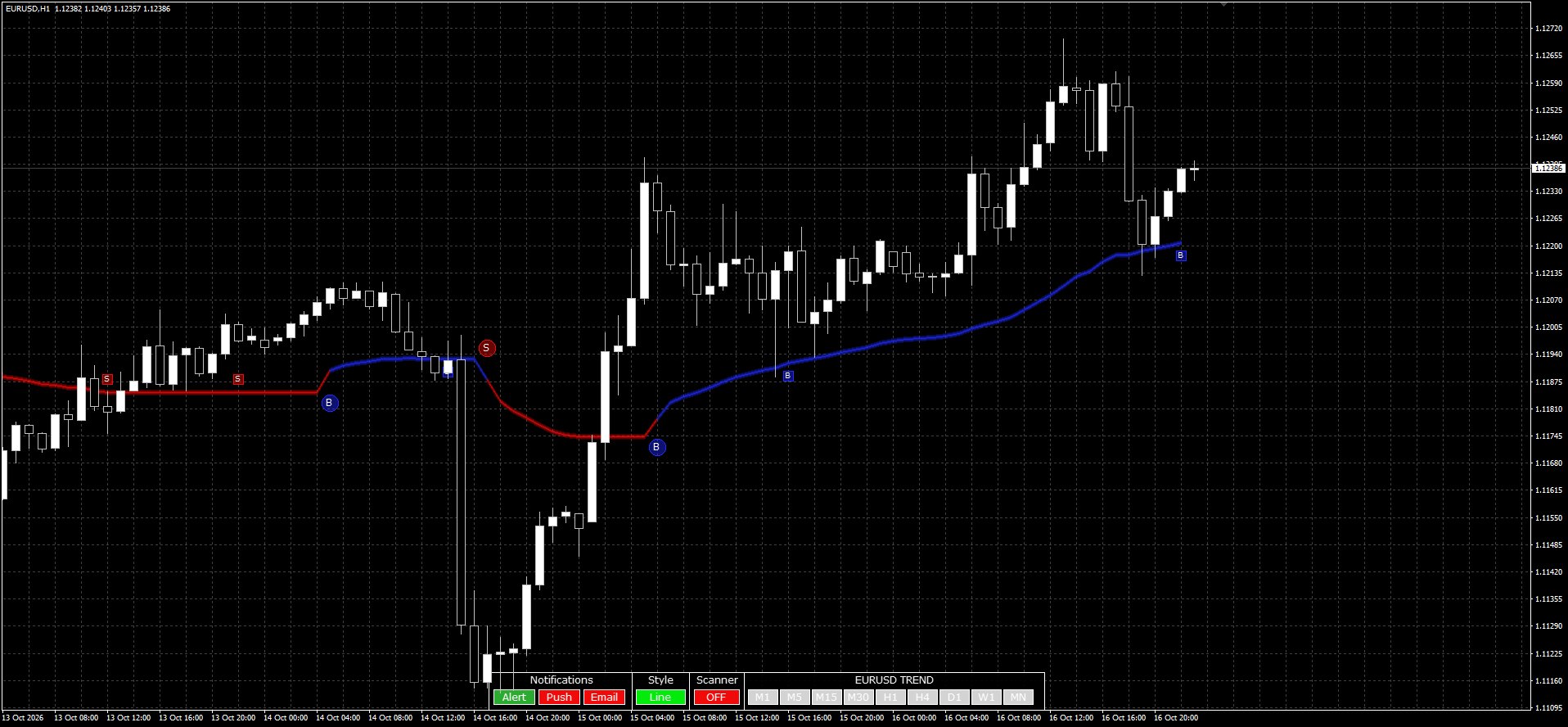
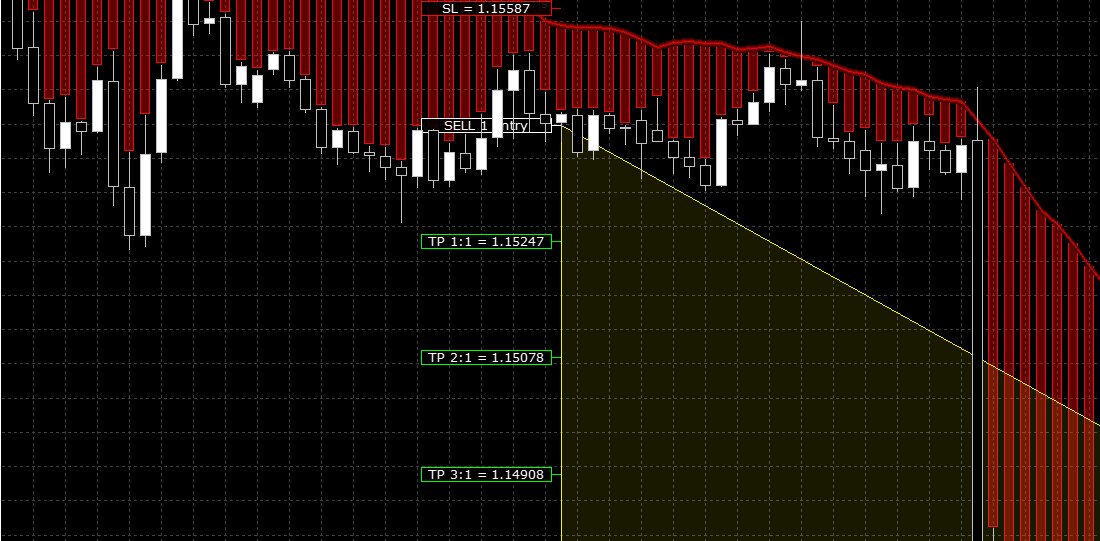
One click on the panel's Style button switches from one style to the next. Default adds a colored band between price and the line. Line keeps only the line and the signals. Classic draws the stop and targets of every signal, with the move label of section 3.
In Default style, just hover over a signal and the indicator draws its levels: the stop loss, the entry, and the targets.
Stop and targets readable by an EA
The same levels are in the MT4 data window: a stop loss and five targets, from 1:1 to 7:1, for every follow-up signal, value by value.
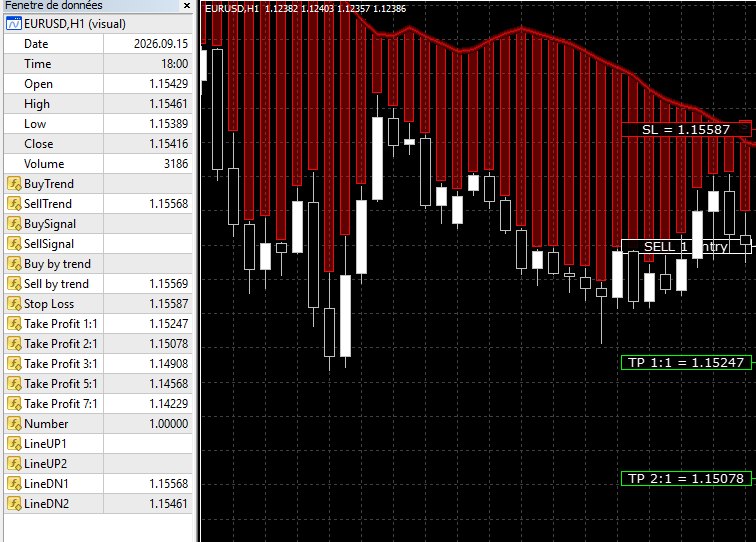
That is what matters for a robot: these values are indicator buffers, readable by an expert advisor with the iCustom function. This test's probe read them exactly that way, 17 values on every bar. On the bar of 15 September 2026 at 18:00, read on the first tick after it closed:
| Buffer | Name in the data window | Value read by iCustom |
|---|---|---|
| 5 | Sell by trend | 1.155687 |
| 6 | Stop Loss | 1.155867 |
| 7 | Take Profit 1:1 | 1.152473 |
| 8 | Take Profit 2:1 | 1.150776 |
| 9 | Take Profit 3:1 | 1.149079 |
| 10 | Take Profit 5:1 | 1.145685 |
| 11 | Take Profit 7:1 | 1.142291 |
| 12 | Number | 1.000000 |
The trend on every timeframe, the scanner and the alerts
At the bottom of the chart, the panel gives the pair's trend on every timeframe, from M1 to MN, green going up and red going down.
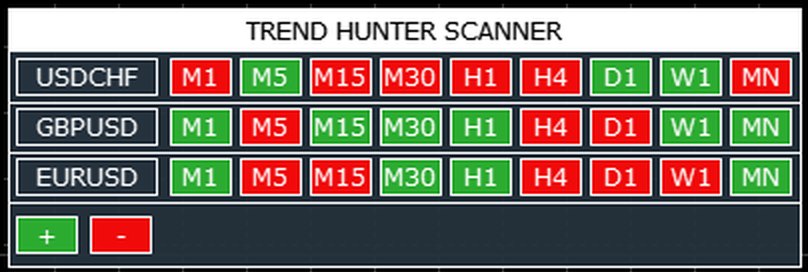
The panel also opens a scanner: the trend of several pairs, from M1 to MN, green going up, red going down. One click on a cell switches the chart to that pair and timeframe, and the panel's timeframe buttons do the same. It is shown here on a live chart, market closed; it is not part of the measurement.
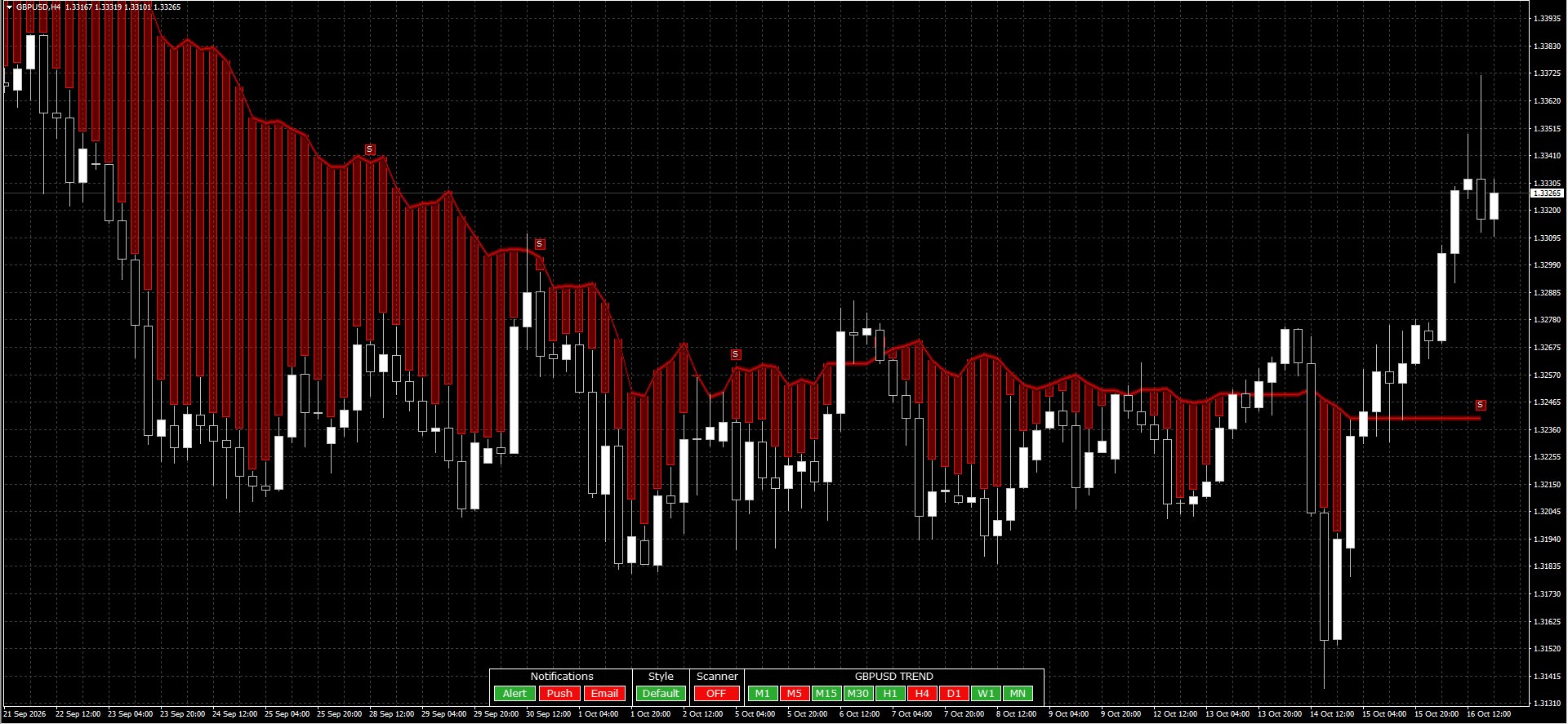
Finally, the panel handles notifications: Alert (an alert in MT4), Push (a notification on the phone) and Email, one button for each.
The test on video, from the features to the check.
Exact test conditions
| Indicator | Trend Hunter version 4.2 for MT4 |
| Platform and data | MT4 build 1492, IC Markets, M1 history downloaded by the tester |
| Symbol and timeframe | EURUSD, H1 |
| Tester | Visual mode, every tick modelling, fixed spread of 10 points |
| Quality | 2,852,791 modelled ticks, 83.42% modelling quality, 0 mismatched chart errors |
| Period | 3 August to 16 October 2026; the 50 compared signals run from 3 August (21:00) to 14 October (05:00) |
| The 50 signals | 12 trend changes (6 buys, 6 sells) and 38 follow-up signals (13 buys, 25 sells) |
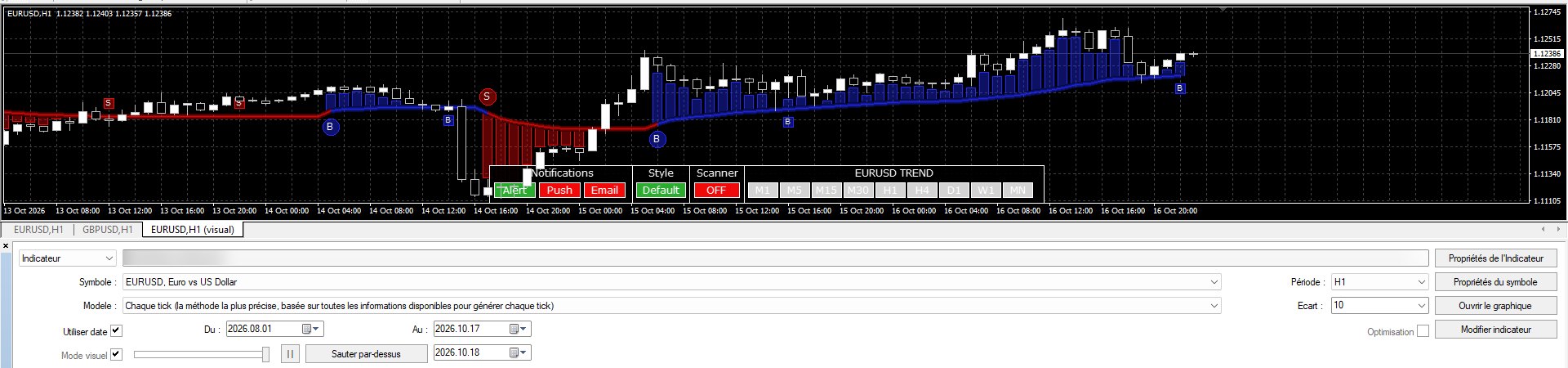
50 signals out of 50 stayed in place
A probe read the 17 values the indicator publishes (arrows, stop loss, targets, signal number) at the close of every bar, then one and two bars later. Those readings were compared with three references on the same history: the same instance re-read at the end of the period, a fresh instance recalculating the whole history at once, and the final state of the test.
Against all three references, the 50 signals are identical: same bar, same type, same arrow price, same stop loss, same 1:1 target, same number. None moved, none disappeared, none appeared afterwards.
| Reference | Identical | Moved | Disappeared | Appeared afterwards | Bars compared | Differences, all values |
|---|---|---|---|---|---|---|
| Same instance, 16/10 00:00 | 50 / 50 | 0 | 0 | 0 | 1,296 | 0 |
| Fresh instance, 16/10 00:00 | 50 / 50 | 0 | 0 | 0 | 1,296 | 0 |
| End of test, 16/10 23:59 | 50 / 50 | 0 | 0 | 0 | 1,296 | 0 |
And not just the arrows: across the 1,296 bars compared, the indicator's 17 values are identical. Between the reading at the close and the re-reading one or two bars later, no value changed. No signal shows on the forming bar: it only appears at the close. Two checks complete the measurement: the test replayed a second time, and a test started in Classic style, give exactly the same signals.
The number on screen, counted again by hand
I read 36 labels on the tester captures (2 others stayed unreadable, placed under the indicator's panel), then counted the same move by hand on the tester bars, from the open of the bar that follows the signal.
First count, up to the stop loss: 29 labels out of 36 match, to the point. The other 7 are all big moves: the label stops when price reaches 8 times the initial risk, even if the market keeps going.
| Signal | Signal bar | Side | Risk (points) | Label | Stop or 8 times the risk | Up to the stop |
|---|---|---|---|---|---|---|
| No. 1 | 03/08/2026 21:00 | Buy | 206 | 1,656 | 1,656 | 1,977 (stop hit) |
| No. 3 | 06/08/2026 20:00 | Buy | 144 | 1,207 | 1,207 | 1,886 (stop hit) |
| No. 12 | 17/08/2026 22:00 | Buy | 146 | 1,213 | 1,213 | 1,328 (stop hit) |
| No. 16 | 28/08/2026 00:00 | Sell | 87 | 726 | 726 | 5,373 (stop not hit) |
| No. 26 | 15/09/2026 18:00 | Sell | 170 | 1,372 | 1,372 | 4,286 (stop not hit) |
| No. 28 | 17/09/2026 16:00 | Sell | 137 | 1,128 | 1,128 | 3,755 (stop not hit) |
| No. 30 | 29/09/2026 02:00 | Sell | 122 | 1,012 | 1,012 | 2,576 (stop not hit) |
With the indicator's rule, up to the stop or up to 8 times the risk (bar included), the count matches all 36 labels. And the label never shows more than the real move. On signal no. 16, for example, the label stops at 726 points; price went as far as 5,373 points without hitting the stop before the end of the test.
Three things to know. The 12 trend changes carry no label: it only exists on follow-up signals. The number moves forward when bars close, not while a bar is forming: on the very last signal of the test, on 16 October at 22:00, the label reads "BUY 2 +0 points" because no bar has closed after it yet. And the labels only exist in Classic style.
The alert fires at the close of the signal bar
For the alert, the indicator ran alone in the tester, and every alert was read in the tester journal, to the second. Result: 50 alerts for the 50 signals (and 55 for the 55 signals of the whole window, no alert without a signal), all at the exact close of the signal bar. None fired early.
| Signal bar (open) | Alert | After the close | Alert text |
|---|---|---|---|
| 03/08/2026 21:00 | 03/08/2026 22:00:00 | +0 s | BUY by price 1.15136; SL = 1.14930 |
| 07/08/2026 04:00 | 07/08/2026 05:00:00 | +0 s | DOWN TREND START |
| 15/09/2026 18:00 | 15/09/2026 19:00:00 | +0 s | SELL by price 1.15417; SL = 1.15587 |
| 14/10/2026 05:00 | 14/10/2026 06:00:00 | +0 s | UP TREND START |
On the 38 follow-up signals, the alert gives a price and a stop: the price is the open of the next bar (38 out of 38), and the stop is the indicator's Stop Loss value (38 out of 38). Trend changes give "UP TREND START" or "DOWN TREND START".
A practical detail: in the tester, the panel's Alert button starts red, so off, even though alerts are enabled in the inputs. One click turns it on. On a live chart too, check its color.

What this test does not say
This test says whether the indicator does what its page announces. It does not say what its entry and stop method would earn: that was not the purpose of the measurement, and no conclusion is drawn about the gains or losses one could get by following it.
It is also a sample: one symbol, one timeframe, two and a half months of data, at one broker. The MT5 version was not tested, and nothing here shows that it behaves the same way.
Trend Hunter MT4 keeps its promise on 50 signals
| What holds | What to know |
|---|---|
| 50 signals out of 50 stayed in place after the close, no signal on the forming bar | The cap at 8 times the risk understates big moves on the label |
| 50 alerts out of 50 at the close of the signal bar, price and stop as expected | Trend changes carry no label |
| 36 labels out of 36 following their rule, never above the real move | Check the Alert button in the tester, it starts off |
As always here: no recommendation to buy or use this indicator is made. This page reports what a measurement gave over a past period.
Frequently asked questions
Does Trend Hunter repaint its signals?
Does the Trend Hunter alert fire before the bar closes?
Is the "+x points" number on the label right?
Was the MT5 version of Trend Hunter tested?
Trend Hunter on the MQL5 Market
The version tested here is the MT4 version. An MT5 version is also available.
This content is educational and is in no way investment advice or a recommendation to buy. An indicator's results measured over a past period do not predict its future behaviour. Leveraged trading carries a high risk of rapid capital loss, up to your entire stake.