
The Ultimate Market Scanner for MT4 & MT5
Stop trading blind. See the real strength of the 8 major currencies and spot the cleanest trends in a single view.
Still picking pairs “by feeling”?
Without a market scanner, you’re flying blind. You miss the real moves and waste time on flat charts.
Random Pair Selection
EURUSD? GBPJPY? You never really know which pair is trending cleanly today. Most of the time it’s a coin flip.
Time Wasted Scanning Charts
Opening 20 charts to find one good trend is slow and exhausting. By the time you’re done, the move is over.
Trading Dead Markets
You enter on pairs stuck in a range because both currencies have similar strength. Result: boredom and small losses.
No “Big Picture” View
Looking at one chart at a time gives you only a tiny slice of the market. You miss the global story behind the moves.
The Solution: A Professional Market Cockpit
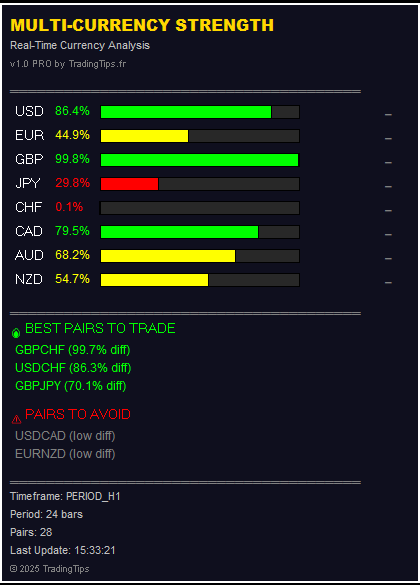
Multi-Currency Strength Dashboard PRO does the heavy lifting: it scans, calculates and ranks the best opportunities.
Real-Time Strength
Continuous measurement of the 8 major currencies (USD, EUR, GBP, JPY, CHF, AUD, NZD, CAD) on your chosen timeframe.
Best vs Worst Pairs
Automatically highlights strong vs weak currency pairs and shows which ones to avoid.
Smart Alerts
Receive PC/mobile alerts when a currency becomes extremely strong or weak, so you never miss a setup.
How to Get the Dashboard
The indicator is sold on the official MQL5 Market. Choose the platform you trade on and download it instantly.
AVAILABLE ON MQL5 MARKET
One-time licence, no subscription. Check the current price directly on the MQL5 product page.
Secure payment handled by MQL5.com • Instant download after purchase
Frequently Asked Questions
⚡ Does the indicator trade automatically?
No. This is an analysis tool. It shows you what is strong, what is weak, and which pairs are trending. You still have full control over your entries and exits.
🤖 Can I use it on both MT4 and MT5?
Yes. There is one product page for MT5 and one for MT4 on MQL5. You can purchase the version that matches your main platform – or both.
📊 Do I need to attach it on all charts?
No. You only need to run it on one single chart. It will scan all 28 major pairs in the background and display them in the dashboard.
🔄 Is it easy to install?
Yes. MQL5 Market installs the indicator automatically on your platform. Once it’s in your Navigator, you just open a chart and attach the dashboard like any other indicator.
LEGAL DISCLAIMER
Trading Forex, CFDs, stocks or crypto involves a high level of risk and can lead to the loss of all your capital. This indicator is a technical analysis tool and does not constitute investment advice. Past performance does not guarantee future results.
© 2025 TradingTips.fr